
Building a Basic Timer in JavaScript
This article is a complementary resource to the JavaScript in Browser course.
This article is a complementary resource to the JavaScript in Browser course.
Building a Basic Timer in JavaScript
Creating a rudimentary timer is a great way to advance your skills in JavaScript.
It also serves as a foundation for building productivity apps, such as the Pomodoro Timer we've made for our JavaScript in Browser course.
At the core of this project lies the
setInterval()
function, which lets us run code repeatedly at a fixed time interval.
So, let's use this function to create a basic timer, and break the process down step by step.
First, we need to decide how long the timer should run. Let's start with 10 seconds for now.
let seconds = 10;
This variable stores the remaining time, which we'll update every second.
Now, we'll use
setInterval()
to display the value of the seconds variable we just created above at an interval of
1
second (or
1000
milliseconds):
setInterval(() => {
    console.log("Timer: " + seconds + "s");
}, 1000);
Compare the code above with the syntax of the
setInterval()
function:
setInterval(function, milliseconds);
Here,
function
- A function containing a block of code.milliseconds
- The time interval (measured in milliseconds) between the execution of the
function.Note: 1 second = 1000 milliseconds.
Thus, the code we've written has the following arguments:
| function | milliseconds |
|---|---|
() => { console.log("Timer: " + seconds + "s"); } |
1000 |
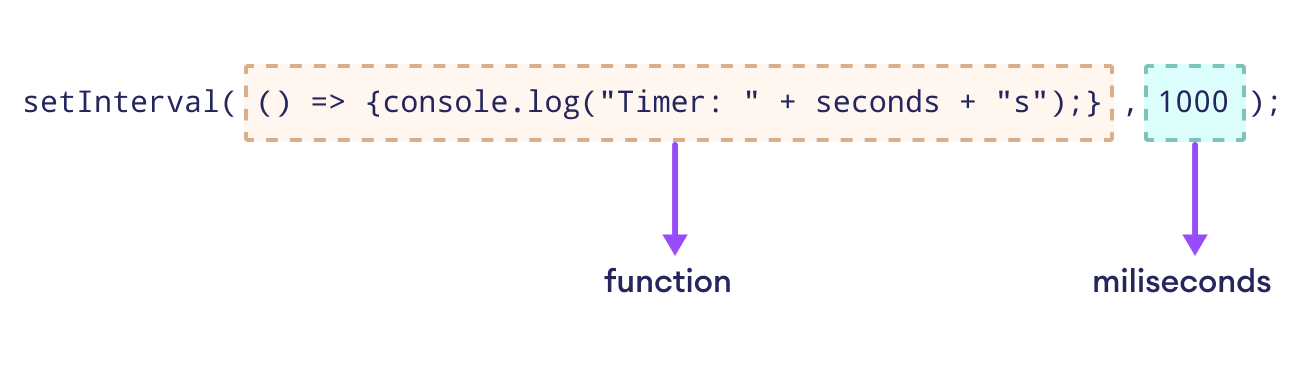
This means that every second, JavaScript will run the function inside
setInterval().
Therefore, it prints the value of the
seconds
variable in the console repeatedly.
But hold on, this still doesn't reduce the time! It just prints the same number over and over.
Let's find a remedy to this problem.
Your average timer counts the time down by
1
second each. Thus, we need to subtract
1
from the
seconds
variable every time the function runs:
setInterval(() => {
    console.log("Timer: " + seconds + "s");
    seconds--; // Reduce time by 1
}, 1000);
Now, the countdown actually works — it prints the desired output:
Timer: 10s
Timer: 9s
Timer: 8s
...
But there is still one problem remaining — the timer doesn't stop at zero! It just keeps going on and on and on, further and further into negative numbers.
Fixing this problem will be the last step in completing our rudimentary timer.
The
clearInterval()
function stops
setInterval()
from running forever. We'll use this function to make the timer stop at zero.
let countdown = setInterval(() => {
    console.log("Timer: " + seconds + "s");
    if (seconds === 0) {
        console.log("Time's up!");
        clearInterval(countdown); // Stop the timer
    }
    else {
        seconds--; // Reduce time by 1
    }
}, 1000);
Note:
We've assigned the
setInterval()
function to the
countdown
variable in order to supply it as an argument to the
clearInterval()
function.
let seconds = 10;

let countdown = setInterval(() => {
    console.log("Timer: " + seconds + "s");
    if (seconds === 0) {
        console.log("Time's up!");
        clearInterval(countdown);
    }
    else {
        seconds--;
    }
}, 1000);