
What People Like About Programiz PRO
Conversations with our learners taught us so much more about our own platform than we ever hoped for.


Conversations with our learners taught us so much more about our own platform than we ever hoped for.
74 days ago, we started conducting learner interviews.
We weren't sure what to expect. We started it as a way to understand what people like about Programiz PRO.
But, working through the process, we realized we needed to change how we thought about these interviews:
They needed to be conversations, not interviews.
And if we're asking learners for their time, the conversation has to be about them.
So, we changed our approach. We made the conversation about them — their stories, their aspirations, and their reasons to pick Programiz PRO for their coding journeys.
Ashmita, who hosted many of these conversations, has shared her experience with them. You can read about it here.
This shift in approach changed how learners shared their experiences. We got to understand what features they loved on Programiz PRO (and why) on a much deeper level.
In this blog, we'll look into a few Programiz PRO features that our learners love — in their own words.
Our commitment to interactivity isn't just a feature choice — it's rooted in our founding story.
When Ranjit, our founder, was teaching programming to his friends, he discovered that no matter how simplified the learning material is, students truly grasp coding only when they write code themselves.
This hands-on feel is exactly what we tried to create with Programiz PRO. Almost every learner we talked with mentioned our hands-on, interactive learning environment as their favorite feature.
"Programiz PRO has a good experience setup – it was better interaction and clear formatting. What I mean by that is: you give one or two basic examples, and then I could try it. And then you showed the answer so I was able to see where I went wrong." - Claire Collins
"The interactivity in the learning experience was the main reason I stuck with the platform. Having concise explanations followed by exercises worked perfectly for me." - Simon Fankhauser
"The practical exercises, which are really important for me, were included in every lesson. That's the reason why I stuck with the platform." - Elijah Victor
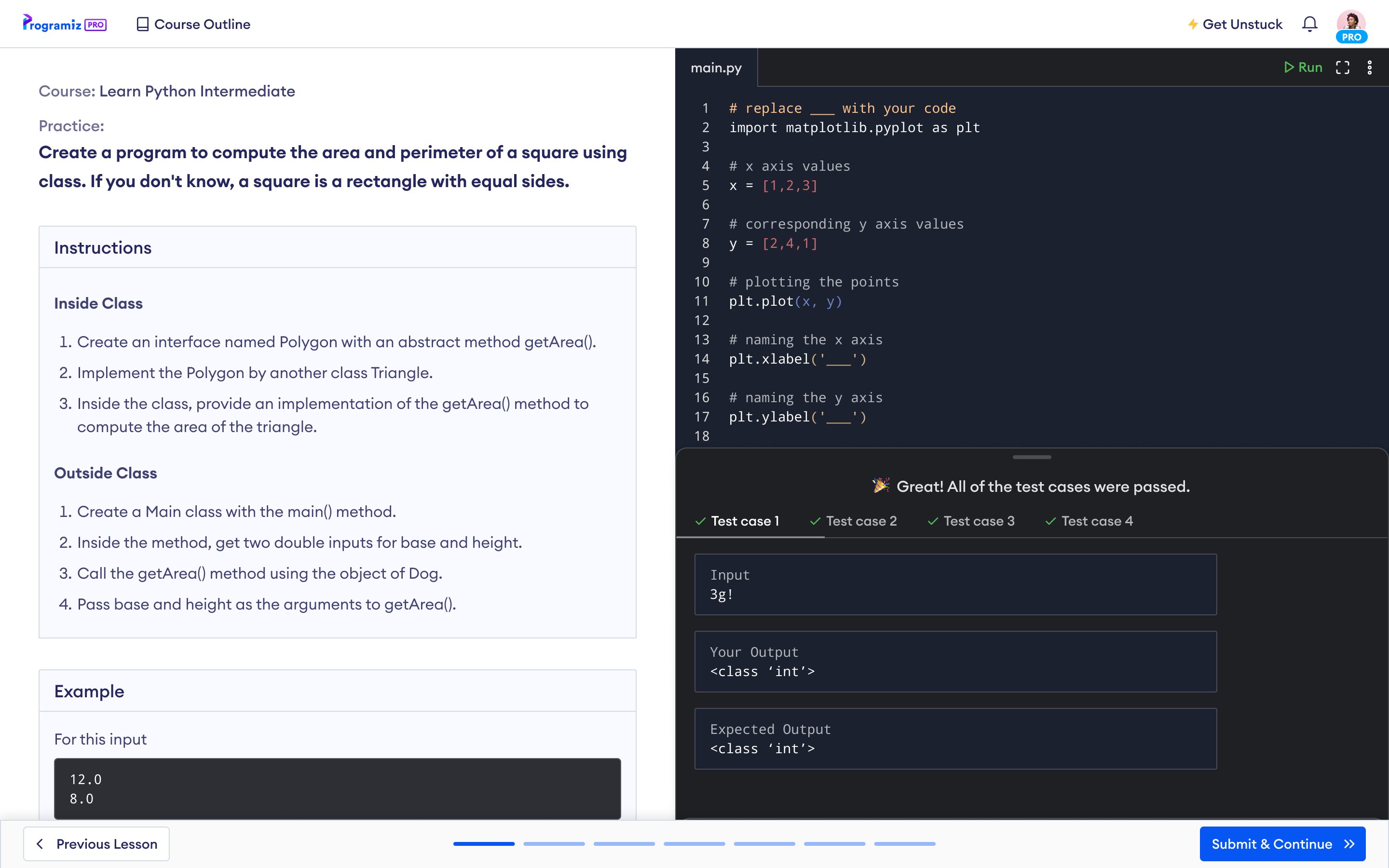
Through all this feedback, we knew interactive learning was as effective as we hoped it would be.
So, what specifically did they have to say about the features that make the learning interactive — practice problems and in-built compilers?
"I like how the practice questions don't give you the full answer immediately. So, I could feel I was getting better at coding as I completed the lessons and practice exercises - that was fun." - Sebastian Castro
"The platform displays both your output and the expected output, which makes debugging much easier. If my code works for some test cases but fails for others, I can quickly identify where the issue might be and what needs improvement." - Learner who wants to remain anonymous
"I really appreciate the sandbox-style code editor within the courses, which makes learning new concepts more hands-on." - Simon Fankhauser
"Best compiler ever! The platform is outstanding, particularly in how it simplifies and clearly explains topics. The helpful visuals provided make it even more impressive." - Eric Shema
The idea of sensAI was inspired by the requests we received from learners for one-on-one mentorship.
We wanted to create something that worked as a personal mentor for our learners without replacing the important process of problem-solving and writing code.
That's what sensAI is — a feature that helps you with errors, explains code, and provides feedback.
And it's great to see people finding value in this.
"What I often found useful was the 'sensAI Explain Code' feature that lets you highlight a specific section of your code and explain it within the context of the entire program." - Elijah Victor
"sensAI is really helpful. Sometimes, when I didn't know how to approach a problem or made mistakes, sensAI guided me by identifying my errors and suggesting corrections. The real-time support made a tangible difference in how well I understood the concepts." - Chen
"I think the AI integration is a great addition — having explanations can be really helpful." - Learner who wants to remain anonymous
"The integrated AI, sensAI was often quite helpful when I couldn't figure out a problem." - Kranthi Kumar Gajji
Conversations about Programiz PRO tend to be dominated by our features and courses. But the smaller details — like the layout and course structure — are just as important as the bigger ones.
Our learners agree with us. They often notice how the layouts and course structures improve the learning experience.
"I really like that you can view different chapters and see a list of upcoming topics and exercises." - Learner who wants to remain anonymous
"You guys do a great job with the formatting. It's clear-cut and easier to understand. It shows you exactly what you are about to go through and what you have already been through." - Claire Collins
"The simplicity, intuitive design, and practical exercises stood out to me. Every lesson is exactly as long as it needs to be. Every tool you need to learn effectively is baked into the platform." - Chen
"The layouts of the course are clear and intuitive, and I loved that I couldn't move on to the next step until I completed the current one - it made sure I truly understood the material." - Tanya Giterman
Feedbacks like these make us feel good about the effort we put into improving the seemingly minor things.
Even those small texts within our lessons, encouraging users to continue, making them feel we understand the struggle, which we do.

Or how we constantly iterate on our lesson pages, like our recent improvements on our quiz and sensAI interfaces.
All these make quite a bit of difference.
(Abidit and Mahesh, our software engineers, have talked about their thought processes behind these small iterations, which you can read here and here, respectively.)
We've always believed our courses are among the best interactive courses for building programming foundations.
Since interactivity is our core principle, we didn't want to go down the route of creating videos because there would be no way to verify if learners actually learned how to write code.
However, we still wanted the personal touch that videos provide, the conversational tone, so that learners feel connected with the course and not be overwhelmed by jargon.
Talking to our learners, we now know we've successfully combined the two.
"The lessons feel like someone personally speaking to me. I can spend less time understanding the sentences and more time understanding what the lesson is trying to teach me.
For the first time, I wasn't overwhelmed by jargon, and I could actually retain what I learned in my JavaScript course." - Andrey Noel
"I appreciate how you guys simplified the explanations, went step by step through each concept, and didn't try to overcomplicate things." - Elijah Victor
"The platform's Java courses guided me from beginner to intermediate levels. They helped me build a great foundation in Java programming." - Kranthi Kumar Gajji
We also discovered that our courses are great complementary resources for someone in bootcamps or doing university degrees.
"The SQL classes in my bootcamp were overwhelming. So, on a teacher's recommendation, I tried Programiz PRO out and instantly loved you guys taught SQL.
When a platform gives me one concept at a time, a short explanation, and a way for me to practice it immediately after the lesson — all in that moment — that excites me because it means I get to experience it on my own." - Tanya Giterman
No matter how well a course is designed for engagement, we can't ignore one possibility — learning to code can feel lonely, especially when you're learning online.
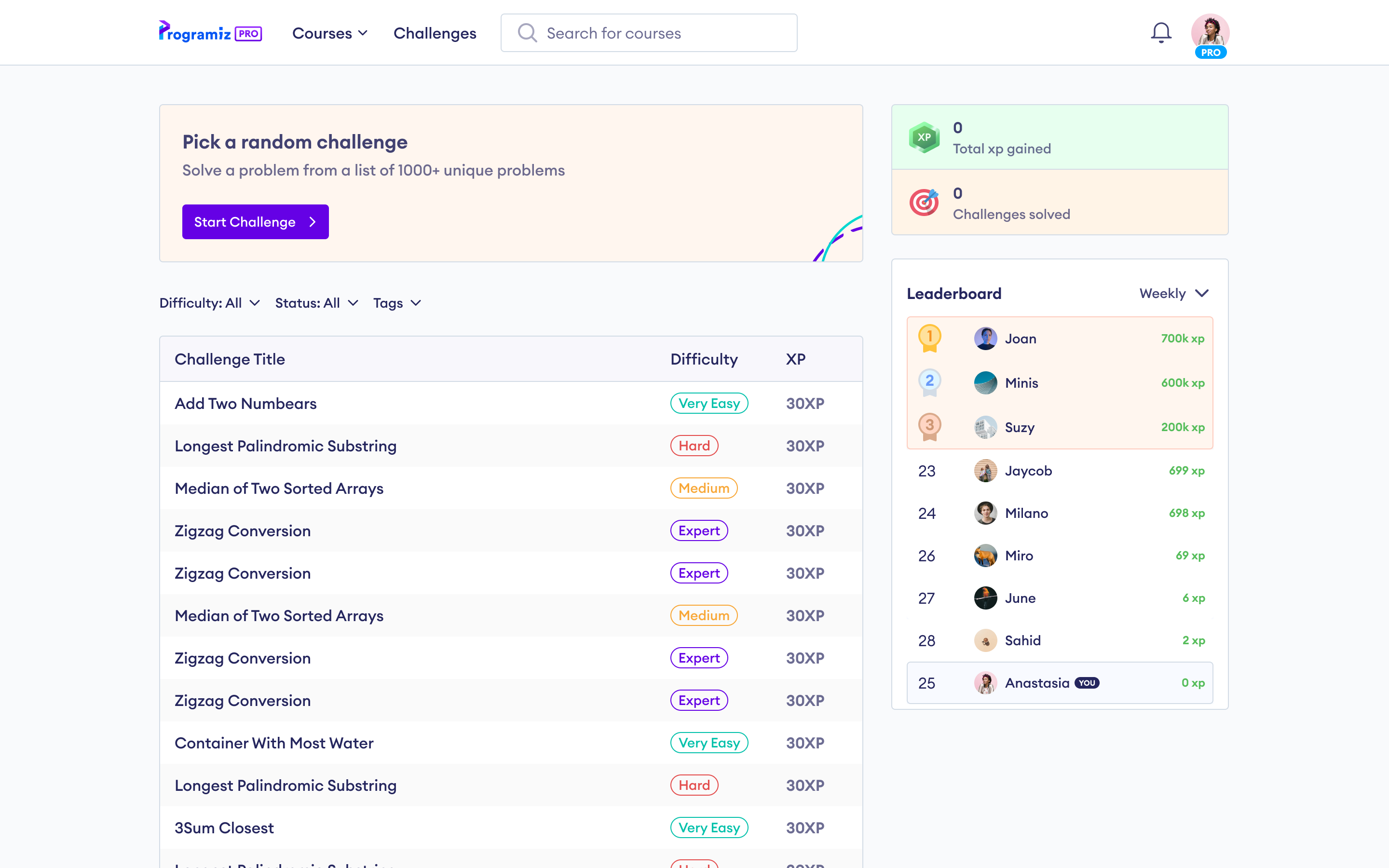
That's why we created our community challenges — to give learners a place to engage with the larger programming community and learn through others' coding solutions.
Plus, it adds a bit of excitement through the global leaderboards — programming is always more fun when there's something at stake, a bit of friendly competition.
"I enjoyed the competitive edge offered by Programiz Challenges. The challenges were so much fun! I couldn't stop playing and competing to climb the leaderboard. It made learning exciting and kept me motivated." - Tanya Giterman
To get into tech, you need to have a bit of experience. In order to gain experience, you need to get into the industry.
I hope you see the problem in this.
Certificates are a way to tackle this problem. They help prove that you have the skills you say you have.
This is also why we include so many practice problems within our courses — so learners get as much hands-on experience with coding as possible even while they're still learning. This adds value to our certifications, so they can be actually useful when people are looking to land their first jobs or internships.
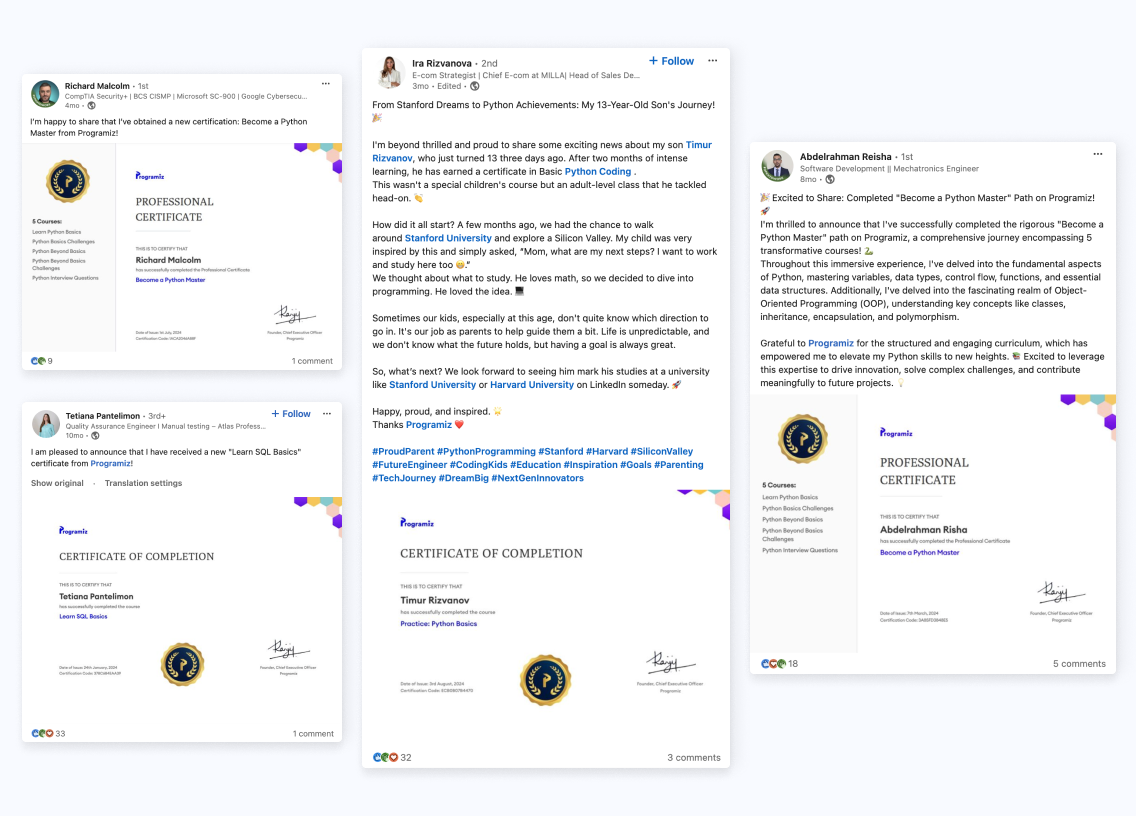
Many of our learners have reported that something as simple as sharing these certificates on LinkedIn helped them feel more confident in their skills when reaching out to potential employers.
"When I finished my Java course, I received a certificate. This has helped me build an impressive resume." - Elijah Victor
"Receiving the certification is a great milestone for me, I've gained a lot of confidence in my coding abilities thanks to the clear, well-organized lessons and practical exercises." - Ashok Aryal
We're always excited to talk to our learners, especially as we add new features and courses on Programiz PRO.
More recently, we're excited about our new code visualizers. Here's what our early adopters are saying:
"I really appreciate these visual learning segments that help me actually learn what I am being taught step by step. Thank you." - Andrew Richard
"Love the visualizer. I am looking forward to using the visualizer in more complex code examples." - S. Brooks
We're eager to sit down with them and further talk about their experiences.
Because…
from all these conversations, we realized something important:
Sometimes, we build things with one use case in mind, but people use them in completely different ways.
One example is the Solution within our practice problems. We didn't create it for this use case.
"I really liked that in addition to the interactive quizzes, you had challenges where you could find your errors and check your work against the right answer." - Claire Collins
This changed how we thought about solutions within Programiz PRO.
Until now, we'd been thinking of them as a way to solve challenges and move past them.
Now, however, we realize there's a bigger learning opportunity there. Solutions are also a way for you to compare your code against the correct one and learn from the differences.
It now seems so obvious, but it's only when we talk to our learners that we learn these.
Moving forward, we'll be talking with more of you. However, we don't just want to talk about our features — we want to hear your stories:
Your story will inspire lots of beginners who are also thinking of getting into coding.
And, if you want to hear all these stories, you can read them on this learner stories page.